 Export
Export selected parts or all parts as an .stl, .ctl, .obj, .wrl, .ply, .ctm, or .3dprint file. Multiple parts will be saved separately, to save an assembly as a single file, first combine the parts using the Combine / Separate command.
-
In the Prepare or Print tab, click Export.
-
Select parts.
Note: Hold down the Shift key and drag to select more than one part.
-
Choose 3D Sprint Document (*.3dprint) or any supported file format in the Export Format list.
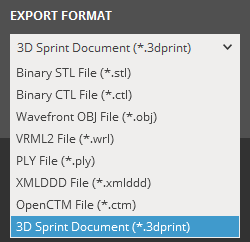
Note: Supported file formats can be found under Supported Files.
-
(Optional) Select the Export As Separate Files and the Use Part Names options if you want export your parts as separate files with their part names.

-
Click Export.
-
Navigate to the folder to save the exported file(s) in and then click OK. If the Use Part Names option is selected, type a name for the files and then click Save.
Note: Supports will not be included in the export.
See Also


