 Layer Time
Supported Printers:
SLS-printers
The Layer/Scan Time is a graphical representation, showing estimated Layers, Heights and Estimated Time at different stages of the build.
For a training video
on how to use this command.
Please visit: https://support.3dsystems.com/s/article/Estimate
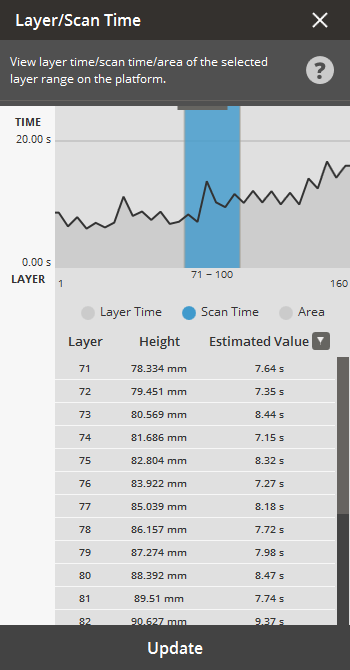
To estimate Layer/Scan Time or Area:
Select the Layer Time command from the Print Tab.
Choose one of the estimation options to view the estimated layer/scan time or area.

Layer Time - This indicates the estimated time required to print a single layer.
Scan Time - This indicates the estimated time required for scanning a layer. It's a non-modal layer range view tool that provides valuable statistics on a per-layer basis.
Area - Measured similarly to times, it's presented as a percentage of the recommended platform area (within the build area margins). For SLS printers, precise control over part placement based on layer area or time is often critical. This feature allows for the visual inspection of part placement configurations, assisting in optimization, whether through automatic or manual placement.
Check the estimation for each layer or area.
Click Update to refresh the estimation.


