Properties
The Properties and Info panels shows the properties of a selected part, file or print job. The information is placed to the right in the application.
Part Properties
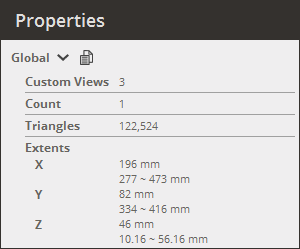
Global
|
|
Custom Views - Total number of saved custom views. Count - Total number of parts loaded on the Parts List. Triangles - Number of triangles in total. Extents - The extents of parts in total. |
Selected Part
Select a part in Prepare or Print modules.
|
|
Custom Views - Total number of saved custom views. Name - Name of selected part. Subparts - Number of subparts in selected part. Triangles - Number of triangles in selected part. Boundaries - Number of boundaries in selected part, open boundaries should be repaired before printing. Volume - The volume of the selected part. Surface Area - The surface area of the selected part. Extents - The extents of the selected part. Translation - The translation of the selected part. Rotation - The rotation of the selected part. Scale - The scale of the selected part. Note: The part transformation can be reposition to its original position by clicking Reset Transform. See Transform for more information. |
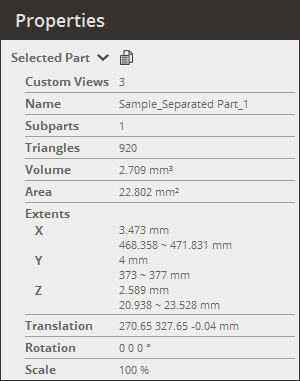
Note: The part properties can be copied from the Properties panel. Click Copy Properties  to copy the part properties and paste them to another application.
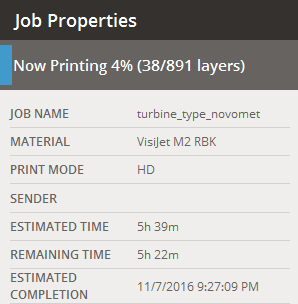
Select a print job in the Print Queue module. Different information will be displayed depending on the job status.
|
|
On the top you can see the print status. The current progress is shown, or if the job is completed, paused, or aborted.
Job Name - Print job identifier that is set when submitting the job. Material - Material that the job uses. Print Mode - Mode of print job. Sender - Host name of the sending client. Estimated Time - Total estimated time to print the job.
For current jobs: Remaining Time - Estimated remaining time until job is completed. Estimated Completion - Estimated time the print job will be completed.
For pending jobs: Estimated Start Time - Estimated time the job can be started. Saved Time - Time the job was saved.
For completed jobs: Total Print Time - Total time to print the job. Completed / Aborted Time - Time that the job was completed or aborted. |